
Samsung Magician
Free
Rating
0.0
Ratings
0
Version
9.0.2
Size
66.9 MB
Ad
Screenshots


Description
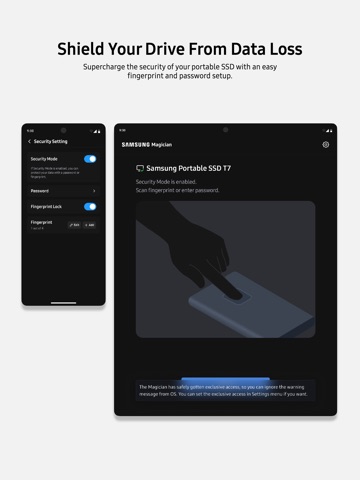
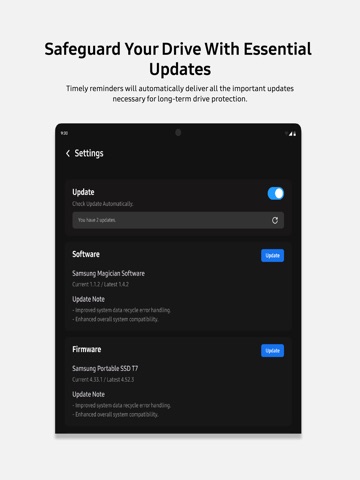
Software that’s so powerful you‘ll wonder if it’s… magic. Quickly and easily manage your Samsung Portable SSDs through Samsung Magician. [App Features] With Samsung Magician, you can, - Access real-time information of your drive anytime, anywhere and keep your drive's health in check. - Unlock the performance that only comes from genuine Samsung memory products by verifying them through remarkably simple steps. - Inspect the health of your drive and detect failures before they happen using S.M.A.R.T check. - Supercharge the security of your drive with an easy fingerprint and password setup. - Receive timely reminders for important updates so as to update the firmware of your drive. [App requirements] - Supports only devices running iPadOS [Requires iPadOS 16.0 or later]. - Exclusively available only on iPads equipped with an M-series chip. - To know whether your iPad is supported, visit https://developer.apple.com/support/required-device-capabilities and select "driverkit" under "Choose a capability" - The app requires Samsung Magician Driver to be enabled. Follow the in-app guide or manually go to the app's settings page to turn it on. [Troubleshooting] [Known Issue - Toggle to enable/disable Samsung Magician Driver does not appear in App Settings] We are aware of an issue where the toggle to enable Samsung Magician Driver may occasionally not appear in the app's Settings page on some iPadOS versions. The driver enable/disable option is provided and managed by iPadOS, and is not controlled by the app. We have reported this behaviour and are investigating into this issue. A potential fix will be identified and released in a future version of the app, where applicable. Meanwhile, here are a few steps you can try currently to restore this option: a. Check and try whether the toggle appears and manually updating it from these locations - On older versions of iPadOS, the option to enable Samsung Magician driver can be found under Settings > Samsung Magician > Drivers. On newer versions, this option is located under Settings > Apps > Samsung Magician. b. Try updating your version of iPadOS or reinstall Samsung Magician and follow the steps again [Known Limitation - P-Series Portable SSD detection over USB4] Samsung Magician v9.0.2 currently supports Samsung P-Series Portable SSD devices over USB3 only. These devices can be detected on iPad models with USB-C ports using either USB-C or USB-4 compatible cables. However, on iPad models with USB4 ports, the device may not be detected when connected using a USB4 cable and so it is advised to use a USB-C cable for the same. USB4 support will be added in a future version of the app.
What’s New
- Support added for newly launched P-Series range of Samsung Portable SSDs in USB3 mode
Bundle ID: com.samsung.magicianios
Age rating: 4+
Minimum iOS: 16.0
Languages: EN
Released: Sep 22, 2024
Updated: Sep 8, 2026
Ad